KWT Spider Logo
v2.0

SEO Spider That Crawls & AuditsYour Website

Discover and fix critical SEO issues fast. Version 2.0 adds a large-site database mode for 50,000+ URLs,an Offline (static folder) crawl mode with broken-asset checks,and resumable crawl sessions. Plus GEO &AIO:get an AI Citation Score so your pages are ready for AI answers (ChatGPT,Perplexity,Google AI Overviews). All-in-one Windows tool—download and install.

  • Discover and fix critical SEO issues fast across 29+ data tabs.
  • GEO &EEAT analysis:AI Citation Score (0–100),definition,FAQ,schema,author,date,and trust signals for generative search and Google AI Overviews.
  • 3 crawl modes:Spider (live site),List (URL list),Offline (static folder + broken assets).
  • Large-site ready:50,000+ URLs,SQLite/DB mode,live crawl monitor,resume crawls &sessions.
  • Export CSV/Excel,Issues Report,generate sitemaps,and llms.txt for AI agents.
KWT Spider Software Box

Size:72 MB · Version:2.0
Available for Windows

🔍
29+
Main data tabs
3
Crawl modes (Spider,List,Offline)
🤖
0–100
AI Citation Score (GEO)
🗄️
50k+
Large-site ready (DB mode)

What Is KWT Spider?

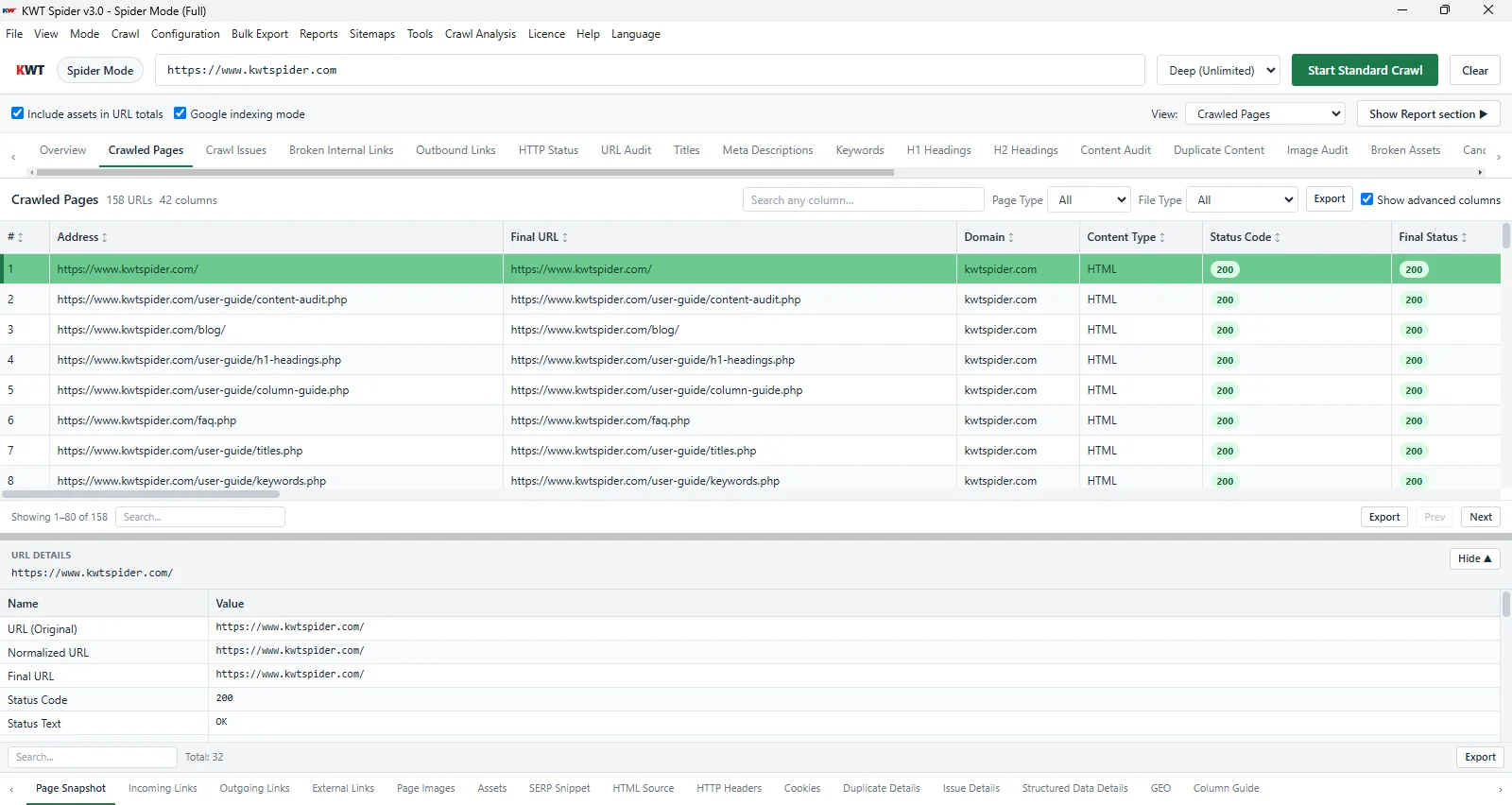
This is a robust site scanner designed to scan,analyze,and audit your site. A desktop app for Windows:first enter a URL (or point it at a list of URLs or a local static folder),then crawl the site,and get all the data you need in organized tabs—internal and external links,page titles,meta descriptions,H1/H2,canonicals,response codes,images,sitemap,security,and much more.

Platform:Windows only (supported versions)

Installation:Required—download KWT Spider and install it on your Windows system.

Use case:SEO crawling,GEO &AIO (AI Overviews) audit,export URLs or reports,site audit,and sitemap generation.

Crawl modes:Spider (live site),List (paste or upload URLs),and Offline (scan a static folder for broken assets before deployment). Demo provides a limited 250 URLs;full licence provides unlimited access (Fast,Default,Deep presets).

Large sites:SQLite/DB mode with a live crawl monitor and resumable sessions keep 50,000+ URL crawls fast and responsive.

GEO &AIO:Enable in Configuration—get an AI Citation Score (0–100) plus EEAT signals per page for AI/LLM citation readiness (ChatGPT,Perplexity,Google AI Overviews).

🛡️

SEO Health Checks

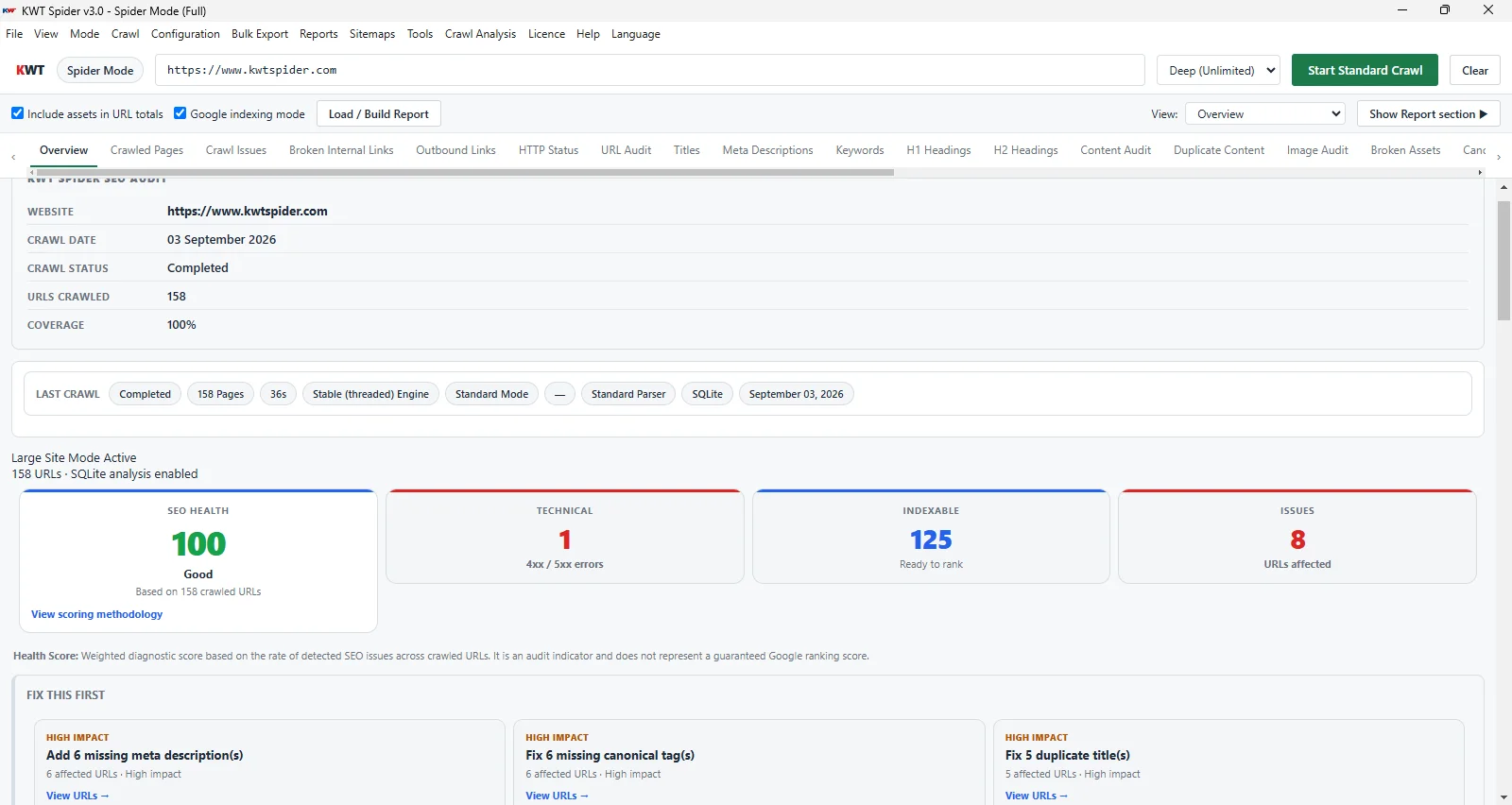
SEO Health Score,issues breakdown,and action plan with priority and impact.

🔍

SEO Audits

Full site crawl,29+ data tabs,sidebar with Overview,Issues,and Site Structure.

📤

Reporting &Exports

CSV/Excel,Issues Report,bulk export,save/load session,segment export.

🗺️

Sitemap Generation

Generate XML sitemaps (pages,images,index),HTML sitemap,and an llms.txt file from your crawl data.

🤖

GEO &AIO

AI Citation Score (0–100),EEAT signals,definition,FAQ,schema,author,date,and summary for ChatGPT,Perplexity,and Google AI Overviews.

🗄️

Large-Site &Offline

SQLite/DB mode for 50,000+ URLs,live crawl monitor,resumable sessions,and Offline static-folder crawls with a Broken Assets tab.

Who Should Use It?

Professionals in SEO (search engine optimization),digital marketing teams,webmasters,and developers who need website health checks,broken link repairs,duplicate content detection,meta and title auditing,pre-launch QA on static folders,or client report generation.

Why KWT Spider is Trusted

The tool is built for professional individuals who need reliable,transparent SEO auditing and fulfills valuable requirements that make this software trustworthy:

🖥️

Runs on your PC

Runs locally on Windows. Your crawl data stays on your system;there is no need to upload to external servers.

🤖

Respects robots.txt

Follows crawl instructions and nofollow rules so your audits align with search engine guidelines.

📊

SEO best practices

The tool detects issues that matter:broken links,duplicate content,meta issues,canonicals,and more.

🔒

No account required

Download and run. No sign-up,no subscription,just install and run—no cloud account needed.

🔁

Resume &save sessions

Pause a large crawl and resume later,or save/load full sessions to keep analyzing and exporting without re-crawling.

What Does the Software Do?

The utility gives you a complete SEO workflow in one tool:

1

Crawls your site

First,add a URL—for example https://example.com—or choose List mode for a fixed URL set,or Offline mode to point at a local website folder. The tool then visits and crawls all discoverable pages,links,and optionally images,respecting robots.txt and nofollow rules.

2

Collects data

For each URL,it gathers status code,content types,title,meta description,H1,H2,word count,canonical,inlinks/outlinks,images (alt,size),pagination,directives,hreflang,JS resources,and more.

3

Analyzes

It analyzes 4xx and 5xx responses,duplicate titles,missing meta,multiple H1s,redirect chains,orphan pages,and other signals to build an SEO Health Score and Action Plan,and shows site structure and segments.

4

Reports

It reports how data appears across 29+ tabs,including internal,external,titles,H1 or H2,response codes,meta,page speed,canonicals,directives,content,images,sitemaps,GEO/EEAT,and security. The sidebar contains Overview,Issues,Site Structure,and Action Plan.

5

Exports

The tool supports the current tab to CSV/Excel,selected URLs,bulk export (all URLs,issues),Issues Report (CSV/HTML),save/load crawl session (including resume),and segment export.

6

Generates sitemaps

From crawl data,you can create XML sitemaps (pages,images,index),HTML sitemaps,and an llms.txt file for AI crawlers and agents.

Why Should You Use KWT Spider?

Get everything you need for audits and proposals in one place:

📈

Improve SEO visibility

Fix broken links (4xx or 5xx) to preserve crawl budget,and correct duplicate or missing titles and meta to improve CTR and relevance—with this tool.

📋

Client-ready reports

Show the complete exported Issues Report in CSV or HTML so stakeholders can fix problems systematically.

⚙️

Technical SEO software

Action plan for canonicals,redirect chains,non-indexable focus pages,orphans,deep or weak pages.

🔗

Content &link audit

Thin content,duplicate content,H1/H2,word count,internal strength,inlinks/outlinks in dedicated tabs.

How does it help with marketing?

All the data you need for a website audit or proposal—total URLs,errors,duplicate titles,missing meta,canonicals,and sitemap status—is in structured tabs and exports,saving time and keeping data consistent.

GEO &AIO – AI Citation Readiness

GEO (Generative Engine Optimization)and AIO (AI Overviews optimization)measure how well your pages are suited to be cited by AI answers—ChatGPT,Perplexity,Google AI Overviews,and similar LLMs. KWT Spider checks each page for citation signals—including EEAT (Experience,Expertise,Authoritativeness,Trust)—and gives an AI Citation Score (0–100). A higher score means your page is more likely to be referenced in generative search results.

How to enable:In the app,go to ConfigurationEnable GEO (Generative Search),then crawl your website. Without this,GEO columns and tabs stay empty.

KWT Spider GEO and AI Overviews citation score audit screenshot
0–100AI Citation Score

Generative Search (GEO) tab

When GEO is enabled,the AI-Powered Searchtab shows per-page data across these signals:

AI Citation Score

0–100 score from definition,FAQ,schema,author,date,summary,plus content depth and internal authority bonuses,minus near-duplicate penalty.

Citation readiness

High (60–70+),Medium,or Low—so you can see at a glance which pages are ready for AI answers and AI Overviews.

Definition

Checks whether the first ~400 characters contain a clear definition (e.g. “X is …”,“refers to”,“means”).

FAQ schema

Detects FAQPage schema so Q&A blocks can power rich results and generative citations.

Article schema

Looks for Article,NewsArticle,BlogPosting,HowTo,or FAQPage markup that helps AI understand page type.

Author &Date

Author info and published/updated dates from meta or schema—key EEAT trust signals for AIO.

Summary

Intro with summary,TL;DR,or key points that models can quote cleanly in AI answers.

EEAT signals

Entity,authority,and trust indicators that feed the site-level EEAT breakdown in Overview.

GEO Issue &Fix Hint

Readable gaps (e.g. Missing Definition,Missing FAQ) with short fixes;full hints in Detail → GEO.

Overview shows AI Citation Readiness (Site)—overall average and High/Medium/Low counts,plus site-level EEAT cards. The Detail panel’s GEO tab includes Readability (Flesch),content depth bonus,internal authority (PageRank) bonus,near-duplicate penalty,and Impact Preview:“If you fix:[list] → Expected AI Score:X → Y”.

For the full column list,score formula,and fix rules,see the app’s GEO guide.

Large-Site Ready:Built for 50,000+ URL Crawls

Version 2.0 adds a SQLite-backed database mode so big sites stay fast and responsive—paginated tabs,lazy loading,and a live crawl monitor keep you informed while the crawl is still running.

SQLite / DB Mode

Crawl data is stored in a local database instead of memory,so tabs stay paginated and fast even at tens of thousands of URLs.

Live Crawl Monitor

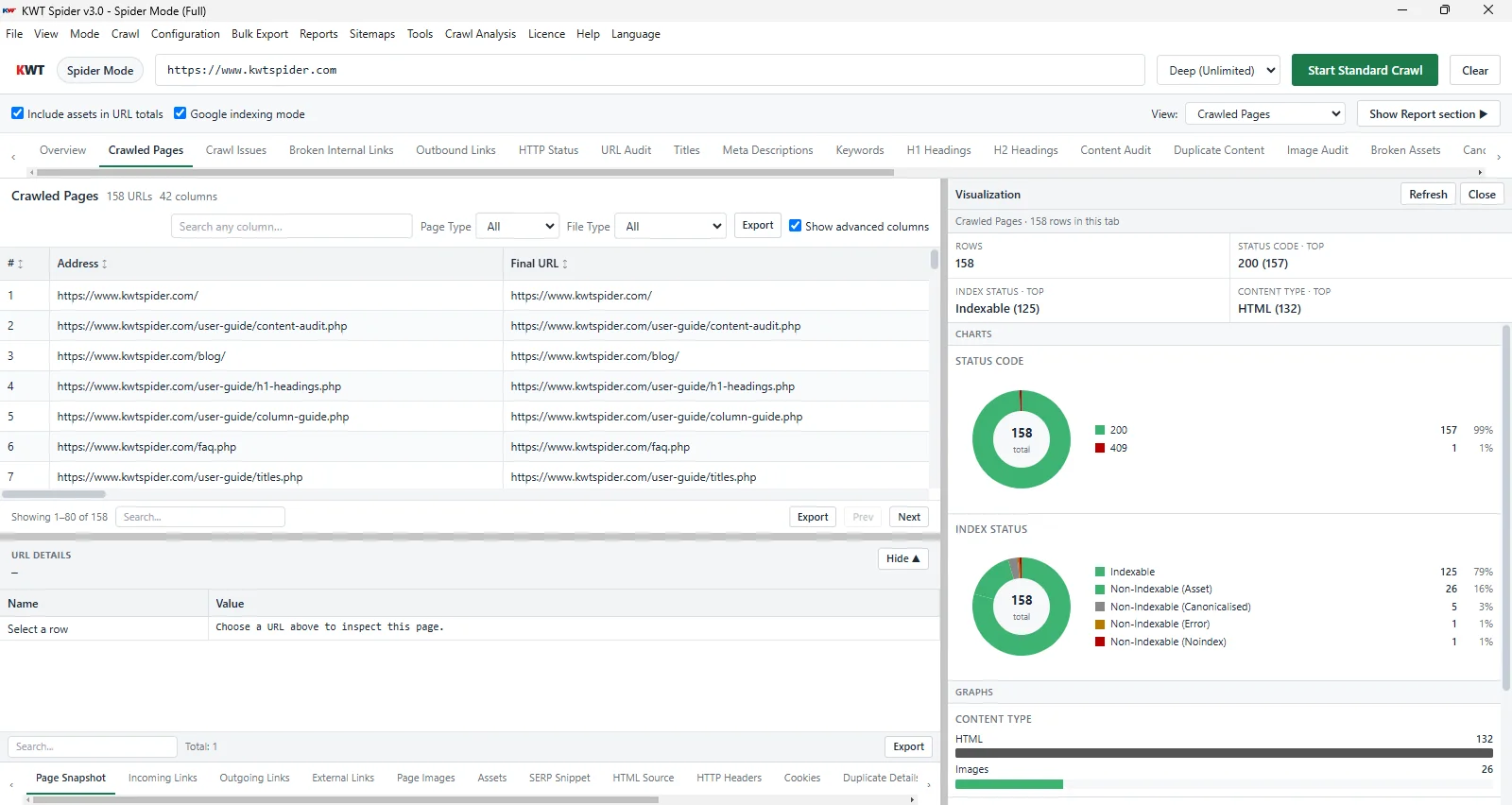
Watch Discovered,Crawled,Remaining,and Progress in real time,plus live content-type and HTTP status buckets as the crawl runs.

Progressive Overview

Overview builds section-by-section instead of waiting for the full crawl;Quick Refresh patches incomplete cards without a full rebuild.

Resume &Sessions

Pause and resume large crawls from a checkpoint,or save/load full sessions to keep analyzing later without re-crawling.

50,000+ URLs readySQLite / DB storageResumable sessions

See KWT Spider in Action!

KWT Spider Video

How It Works

Follow these steps for your first crawl:

In the top bar,enter the website's start URL,such as https://yoursite.com,or switch to List mode (a fixed URL set) or Offline mode (a local static folder). Optionally enable Crawl images,choose a preset (Fast/Default/Deep),and select the Fast or Stable engine.
Start the crawl so the tool can fetch URLs according to your settings (robots.txt,link discovery,and optional image crawl). On large sites,the live crawl monitor shows Discovered,Crawled,Remaining,and Progress as it runs.
Each response is parsed and stored—titles,meta,headings,links,canonicals,status codes,images,and more—so analysis and reports stay structured. Large crawls use SQLite/DB storage to keep tabs fast.
As the crawl runs and completes,data tabs and the sidebar (Overview,Issues,Site Structure,Action Plan) reflect live results,with the Overview building progressively section-by-section.
Export CSV/Excel from tabs,save or load a session (or resume a large crawl from a checkpoint),run bulk exports or Issues Reports,and generate XML/HTML sitemaps and an llms.txt file from the crawl.

Features (Full List)

Crawl

Spider / List / Offline modesFast / Default / Deep presetsCrawl images (optional)Follow nofollow (optional)Respects robots.txtAsync (fast) &Stable enginesPause / Resume / Retry failed URLs

Interface

29 main data tabsLarge-site DB mode (50,000+ URLs)Live crawl monitorSidebar:Overview,Issues,Site Structure,URL detailsSearch,filter and sort per tab

Analysis

SEO Health Score from 0–100Issues breakdownAction Plan with priority + impactSegments like indexable,errors,duplicateSite structure by pathGEO &EEAT scoring

Export

Tab – CSV / ExcelExport selected URLsBulk – All URLs,IssuesIssues Report (CSV/HTML)Save / Load session,incl. ResumeXML / HTML sitemaps + llms.txt

GEO (Generative Search)

AI / LLM Citation Score (0–100)EEAT signalsDefinition / FAQ / Schema / Author / Date / SummaryNext-Gen Search (GEO) tab &filtersDetail panel GEO tab,Impact PreviewEnable in Configuration

Large-Site &Offline

SQLite / DB mode for 50k+ URLsLive crawl monitor &progressive OverviewOffline (static folder) crawl modeBroken Assets tab (missing CSS/JS/images)Resume crawl / sessions

Crawl Modes Comparison

Pick the right mode at a glance. KWT Spider offers three ways to run your audit:live site,a list of URLs,or a static folder.

SpiderListOffline
InputOne start URLList of URLs (paste or file)Root folder on disk
DiscoveryFollows links,discovers pagesNo discovery — only your listScans folder,no server
NeedsLive site (or local server URL)List of URLsFolder with HTML/PHP/ASP files
Best forFull live site audit,large-site DB modeAuditing specific URLsStatic site before deployment
Change modeMode menu → Spider / List / Offline
Broken Assets tab:In Offline mode,KWT Spider also checks each page for missing CSS,JS,images,and favicons referenced on disk—so you catch broken static files before you deploy.

Read the full Crawl Modes guide →

SEO Tabs and Reports – What Data You Get

Across 29 main data tabs,each one shows a specific type of data,and all of it is relevant for technical SEO,GEO,and marketing.

TabDetails
InternalAll internal URLs such as Address,Status Code,Index Status,Title,Meta Description,Internal Strength,SEO Priority Page,Inlinks/Outlinks,Word Count,Canonical,Depth
ExternalExternal links such as Source URL,External URL,Follow/Nofollow,Anchor Text,Target Domain
Response CodesURL,Status Code,Final URL,Redirect Type,Chain length
URLURL length,path depth,query params,uppercase/underscore/trailing slash
Page TitlesURL,Title,Length,Pixel width,Duplicate flag
Meta DescriptionURL,meta description,length,missing/duplicate
H1/H2H1 text,count,missing/multiple;H2 count,list
ContentWord count,text/HTML ratio,thin content flag
Duplicate ContentDuplicate / near-duplicate groups,match %,canonical and fix guidance
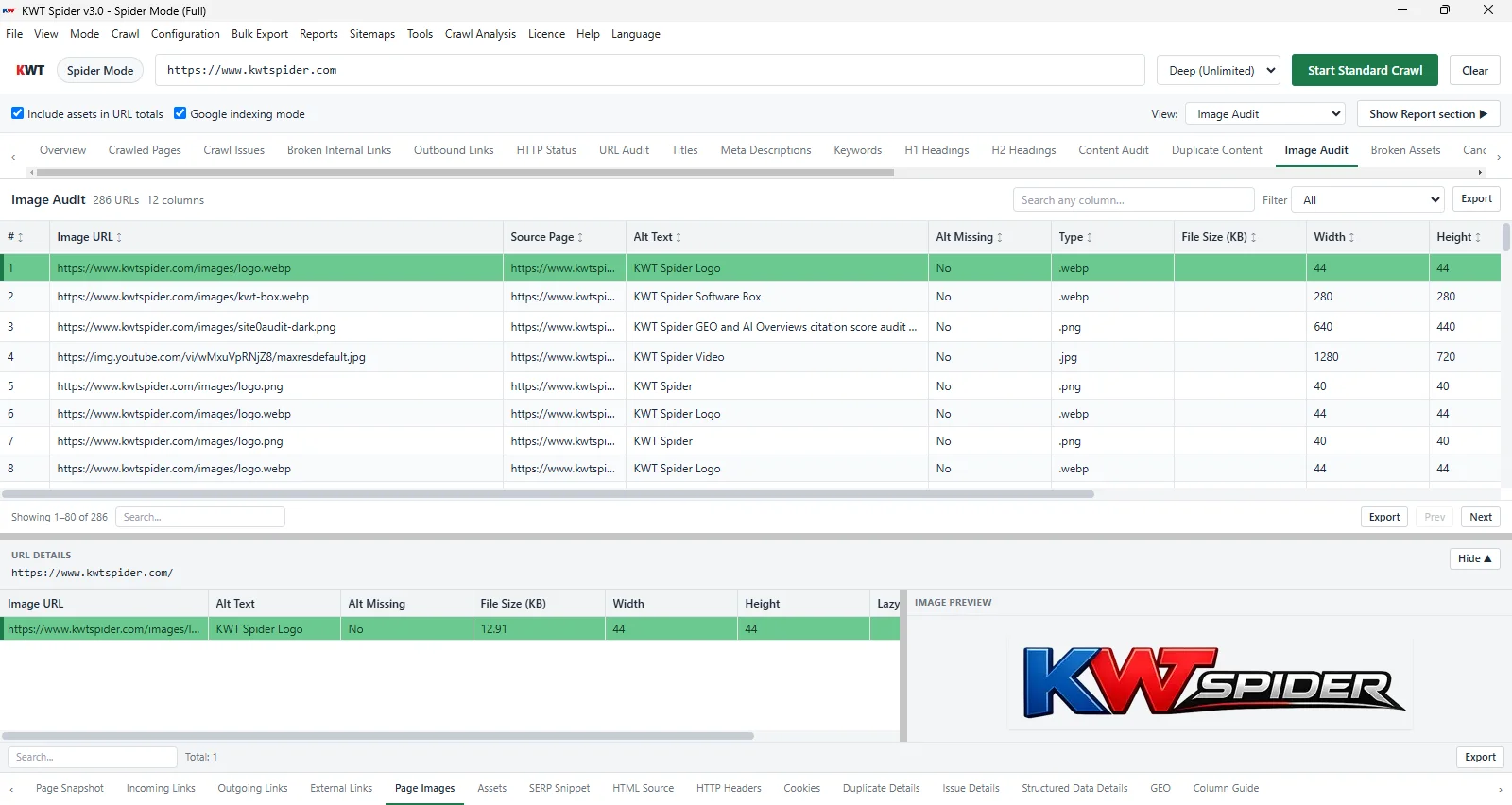
ImagesImage URL,source page,alt text,alt missing,size,dimensions
Broken Assets (Offline)Page URL,asset type (CSS/JS/image/favicon),missing file path—available in Offline mode
CanonicalsURL,canonical URL,type,missing/conflict
Query ParametersParameter names/values,indexability,canonical,duplicate group
Pagination,Directives,Hreflang,JavaScript,LinksRelevant SEO/technical data per URL
Generative Search (GEO / AIO)AI Citation Score,AI Overviews readiness,EEAT signals,definition/FAQ/schema/author/date,fix hints
Structured Data,Sitemaps,Page Speed,SecuritySchema validation,sitemap coverage,page speed tier,security signals

Issues &Action Plan

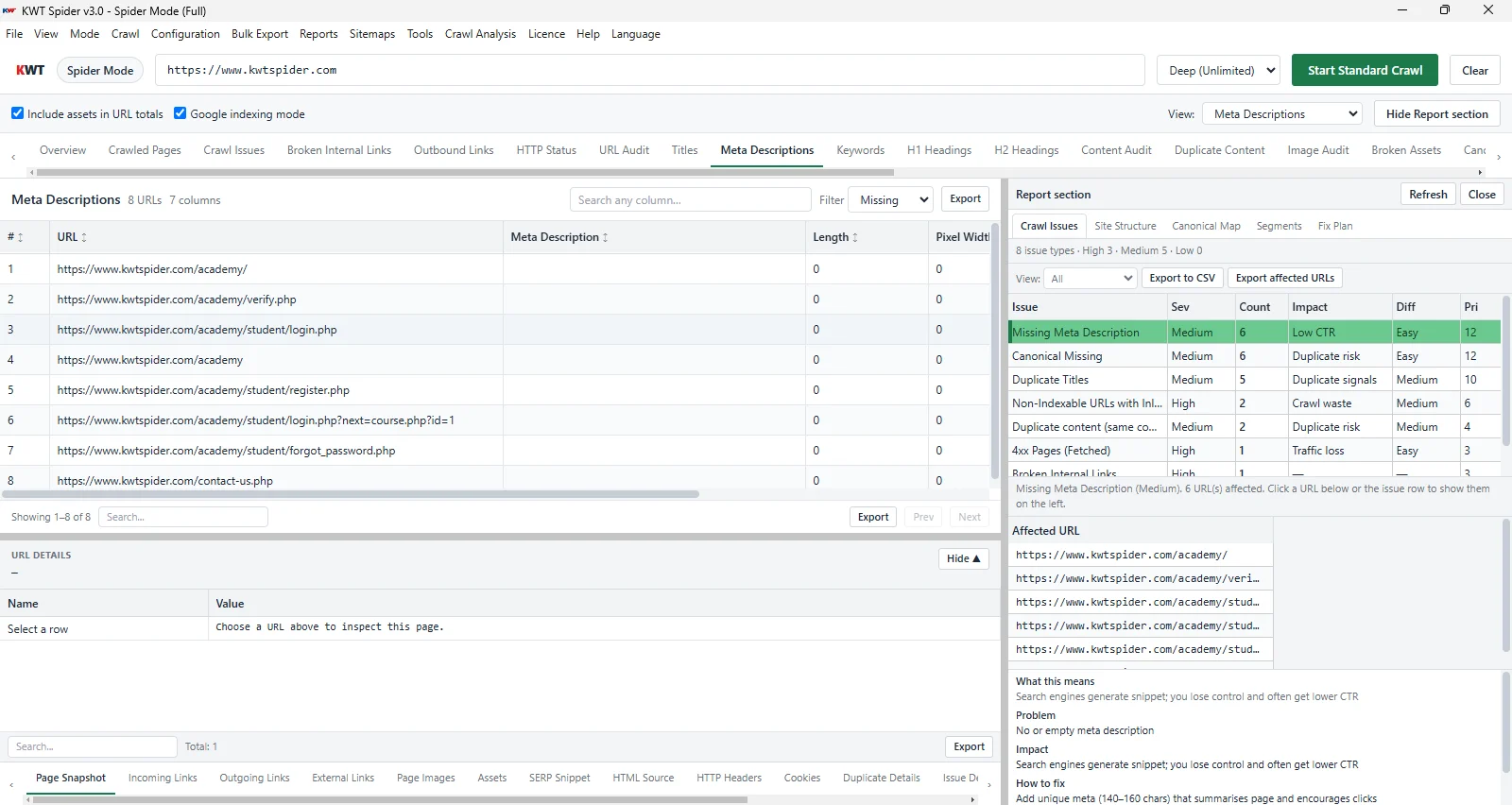
The tool automatically detects issues and explains what each means,why it matters,and how to fix it. It provides an SEO Health Score from 0–100 and an Action Plan that gives you a priority order for fixes.

  • 4xx / 5xx– Broken pages,server errors – fix or redirect
  • Canonical external / missing / conflict– Add self-referencing canonical
  • Non-index with inlinks– Correct noindex or reduce links
  • Missing / duplicate title or meta description– Use unique titles and 150–160 char meta
  • Duplicate content– Differentiate or use canonical
  • Multiple H1,missing H1– One descriptive H1 per page
  • Long URLs,missing alt,low word count– Shorten URLs,add alt,add content
  • Non-HTTPS– Redirect HTTP to HTTPS
  • Redirect chain long or loop– Shorten chain,remove loop
  • Orphan / deep / weak pages– Add internal links and reduce depth
  • Broken assets (Offline)– Missing CSS/JS/images referenced on disk – fix paths before deploy
  • Pagination,non-indexable focus pages,inconsistent trailing slash– Add canonical and use one URL form

SEO Health Score

80+Good. 60–79Needs work. <60Critical. The breakdown and "Why score is low?" appear in the sidebar Overview. The Action Plan shows priority and impact for each issue – click to filter the Issues tab.

Export &Sitemaps

Get your crawl data out in the format you need – per tab,bulk,or as client-ready reports and sitemaps.

📤Export options

CSV / Excel
Current tab
Export → CSV or Excel with column mapping from any data tab.
CSV
Selected URLs
Select rows,right-click → Export selected to CSV.
Bulk
All URLs / Issues
Export all crawled URLs (CSV) or full Issues report in one go.
CSV / HTML
Issues Report
File → Export Issues Report. Client-ready CSV or HTML.
Session
Save / Load / Resume
Save crawl results,resume a large crawl,or analyze and export later without re-crawling.
CSV
Segment export
From sidebar Segments,export the selected segment to CSV.

🗺️Generate sitemaps

From your crawl,generate sitemaps for search engines,human visitors,and AI agents.

XML (pages)XML (images)IndexHTML sitemapllms.txt

Menu:Sitemaps → Generate Sitemap → choose output folder,set options (including llms.txt) → Generate.

Download KWT Spider

Download and install KWT Spider2.0 on Windows. Your crawl data stays on your PC.

  • OS:Windows 10 or later
  • Installation:Required – download and install on Windows
  • Internet:Required only for crawling your website
  • Large sites:SQLite/DB mode handles 50,000+ URL crawls

Demo vs Full – What Changes

DemoFull
Crawl limit250 URLsUnlimited
Export &sitemapsNot availableCSV/Excel,Issues Report,XML/HTML sitemaps,llms.txt
Save / Load / Resume sessionNot availableAvailable
Compare projectsNot availableAvailable
GEO &EEAT analysisPreview onlyFull scoring &fix hints

FAQs

This is an application that crawls websites and scans SEO performance—for instance titles,H1,H2,internal and external links,meta,response codes,exports,sitemaps,and issues—all in one place.
No. It is a standalone application;there is no requirement to acquire any additional software.
SEO professionals,digital marketers,webmasters,and developers.
The demo version crawls 250 URLs only. With the paid version you can crawl unlimited URLs (Fast,Default,and Deep presets),and on large sites the SQLite/DB mode keeps 50,000+ URL crawls fast and responsive.
CSV,Excel for current tab,selected URLs,bulk for all URLs and issues,CSV or HTML for Issues Report,save/load/resume crawl session,segment export,and for Sitemaps XML (pages,images,index),HTML sitemap,and llms.txt.
Yes,the tool respects robots.txt,and optionally,you can follow nofollow links via configuration.
GEO (Generative Engine Optimization) and AIO (AI Overviews optimization) are the tool’s features for AI and LLM citation readiness. Enable GEO in Configuration → Enable GEO (Generative Search),then crawl. You get an AI Citation Score (0–100) per page based on definition,FAQ,schema,author,date,summary,and EEAT (Experience,Expertise,Authoritativeness,Trust) signals,plus bonuses for content depth and internal authority. Higher scores mean your pages are more likely to be cited in AI answers (ChatGPT,Perplexity,Google AI Overviews). See the Generative Search (GEO) tab in the app for the full guide.
Offline mode scans a local website folder (HTML/PHP/ASP) as if it were a live site,without needing a server. It's ideal for pre-deployment QA,and it powers the Broken Assets tab,which lists pages that reference missing CSS,JS,images,or favicons on disk.
Yes. Version 2.0 adds a SQLite-backed database mode for crawls of 50,000+ URLs,with paginated tabs,a live crawl monitor (Discovered / Crawled / Remaining / Progress),and a progressive Overview that builds section-by-section instead of waiting for the full crawl.
Yes. You can pause and resume large crawls from a checkpoint,or save and load full crawl sessions to keep analyzing and exporting data later without re-crawling the site.

Ready to Audit Your Site?

Download KWT Spider 2.0 and run your first crawl in minutes—29+ data tabs,GEO &EEAT scoring,large-site DB mode,and Offline checks,with no account required.